
 Zandolie
One phone passed around the office
Whoever has the phone has the customers. Everyone else waits their turn.
Zandolie Inbox
Zandolie Inbox puts every customer chat in one shared inbox, so the right person replies fast and nothing gets lost.
On the official WhatsApp Business Platform. No AI, just your people, organised.
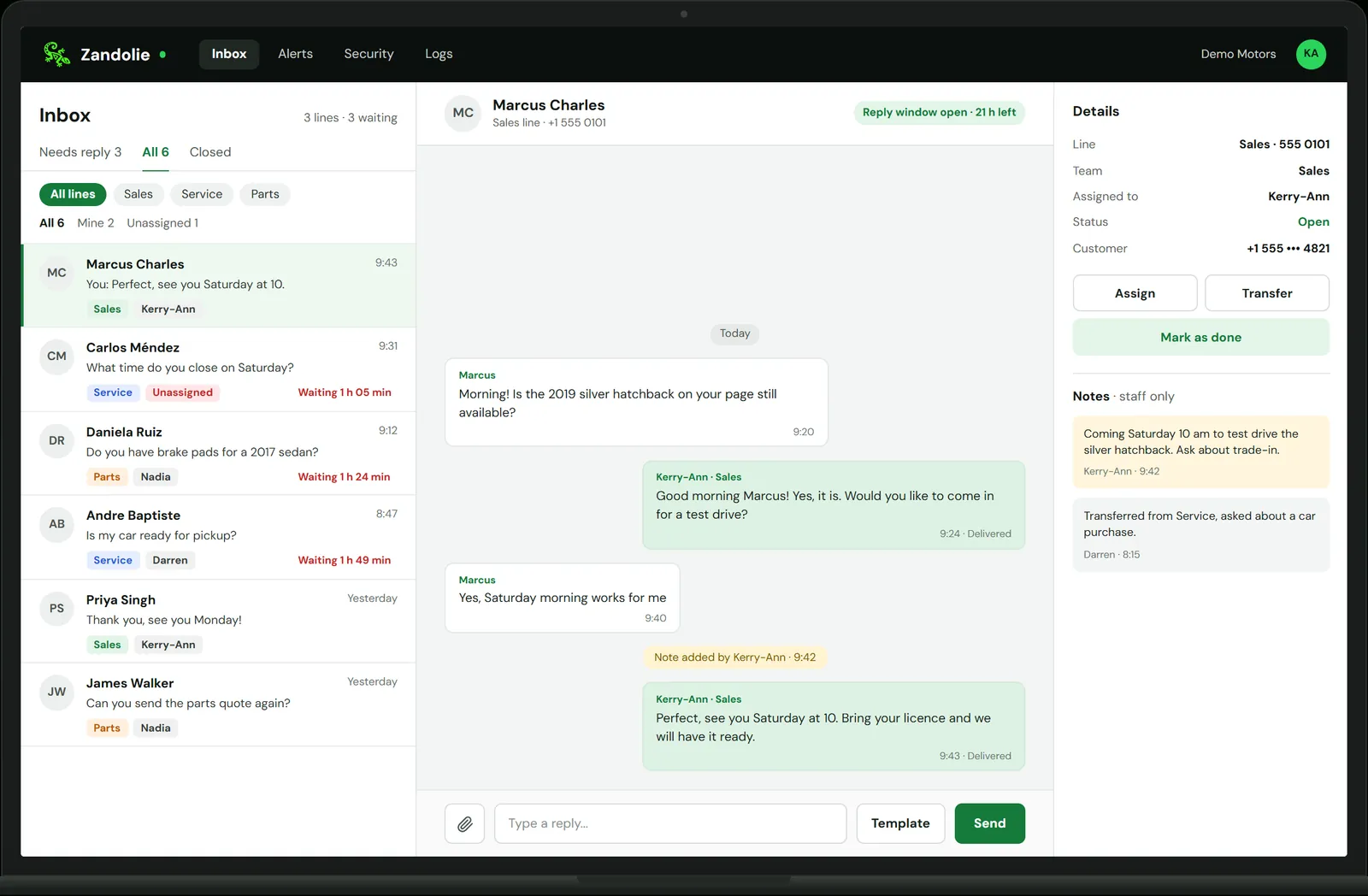
Animated demo of Zandolie Inbox at Demo Motors: Marcus asks on WhatsApp whether the 2019 silver hatchback is still available. His chat moves to the top of the Sales line and is assigned to Kerry-Ann, who replies and offers a test drive. Marcus says Saturday morning works, Kerry-Ann adds a staff-only note, confirms Saturday at 10, and marks the chat as done. Other customers' waiting times count up in the list.
Sound familiar?
Whoever has the phone has the customers. Everyone else waits their turn.
Messages sit unread while everyone assumes someone else has answered.
Prices, promises and photos get lost in one long chat that nobody can follow.
Live today
Every chat lands in one inbox. Your team picks it up, passes it on and closes it, with the whole history in one place.
Sales, Service, Parts: each team sees its own chats, and admins see everything.
Give a chat to the right person, or move it to another team. The whole history goes with it.
Leave a note for a colleague right in the chat. Your customers never see it.
Send and receive the same media your customers already use on WhatsApp.
Get an email when a chat has waited too long for a reply, so nobody is forgotten.
Send approved message templates for reminders and follow-ups, and reopen a conversation after it has gone quiet.
Each person replies from their own phone or computer. No more passing one handset around.
Every user signs in with a second step, and you can see each time our support team opens your account.
We set it up for you
You don't have to work out Meta's setup on your own. We do it with you.
We help you get your business verified with Meta, step by step.
We connect your WhatsApp number, or several, on the official WhatsApp Business Platform.
We set up your teams, add your staff and decide with you who sees what.
We train your team, so they're replying from the shared inbox from day one.
Pricing
US$20 per user a month, from 3 users, with one WhatsApp number included.
US$20 per user/month
One shared WhatsApp inbox for your whole team. No AI, just your people, organised.
Talk to us
For 25+ users or multiple sites.
Meta charges its own fees for WhatsApp business messages and bills you directly, at Meta's rates. We don't add anything on top. Setup and onboarding are quoted on your demo call.
Meta charges its own fees for WhatsApp business messages and bills you directly, at Meta's rates. We don't add anything on top.
Yes, in most cases. We check your number during setup and tell you if anything needs to change first.
Zandolie Inbox starts at 3 users. For 25 users or more, talk to us about volume pricing.
No. Your team replies to every message. If you'd like AI to answer prices and stock later, you can add the Zandolie AI agent on the same inbox.
Every user signs in with two-step login, each team sees only its own chats, and every support access is logged. Read more on our Trust & Security page.

We'll set up a walkthrough on a real WhatsApp number and answer your questions about pricing and onboarding.
Leave your details and we'll message you on WhatsApp within one business day.
Thanks, we've got it. We'll message you on WhatsApp within one business day.
Prefer email? hello@zandolie.ai